
Biometric Attendance Software helps businesses track employee clock-ins, working hours, shifts and attendance more accurately. Discover how Wagemaster Time Attendance and ZKTeco terminals connect attendance data with payroll and HR processes.
Biometric Attendance Software has changed the way many businesses approach employee time tracking. Instead of relying entirely on paper registers, attendance books or manually maintained spreadsheets, organisations can use biometric technology to verify employees as they clock in and out and create a digital record of attendance.
For organisations managing multiple employees, Biometric Attendance Software can provide a more structured way to monitor working hours, shifts, lateness, absences and attendance records while reducing repetitive manual attendance tracking.
What Is Biometric Attendance Software?
At its simplest, Biometric Attendance Software is used to record employee attendance by linking a person’s identity to a biometric or other authentication method and then storing the resulting clocking information for attendance management.
Depending on the terminal and configuration, employees may verify their identity using fingerprint recognition, facial recognition, RFID cards or a password. ZKTeco‘s current time-attendance range includes terminals offering different combinations of these methods, alongside communication options such as TCP/IP, Wi-Fi, Bluetooth, 4G and USB on selected models.
Wagemaster Time Attendance
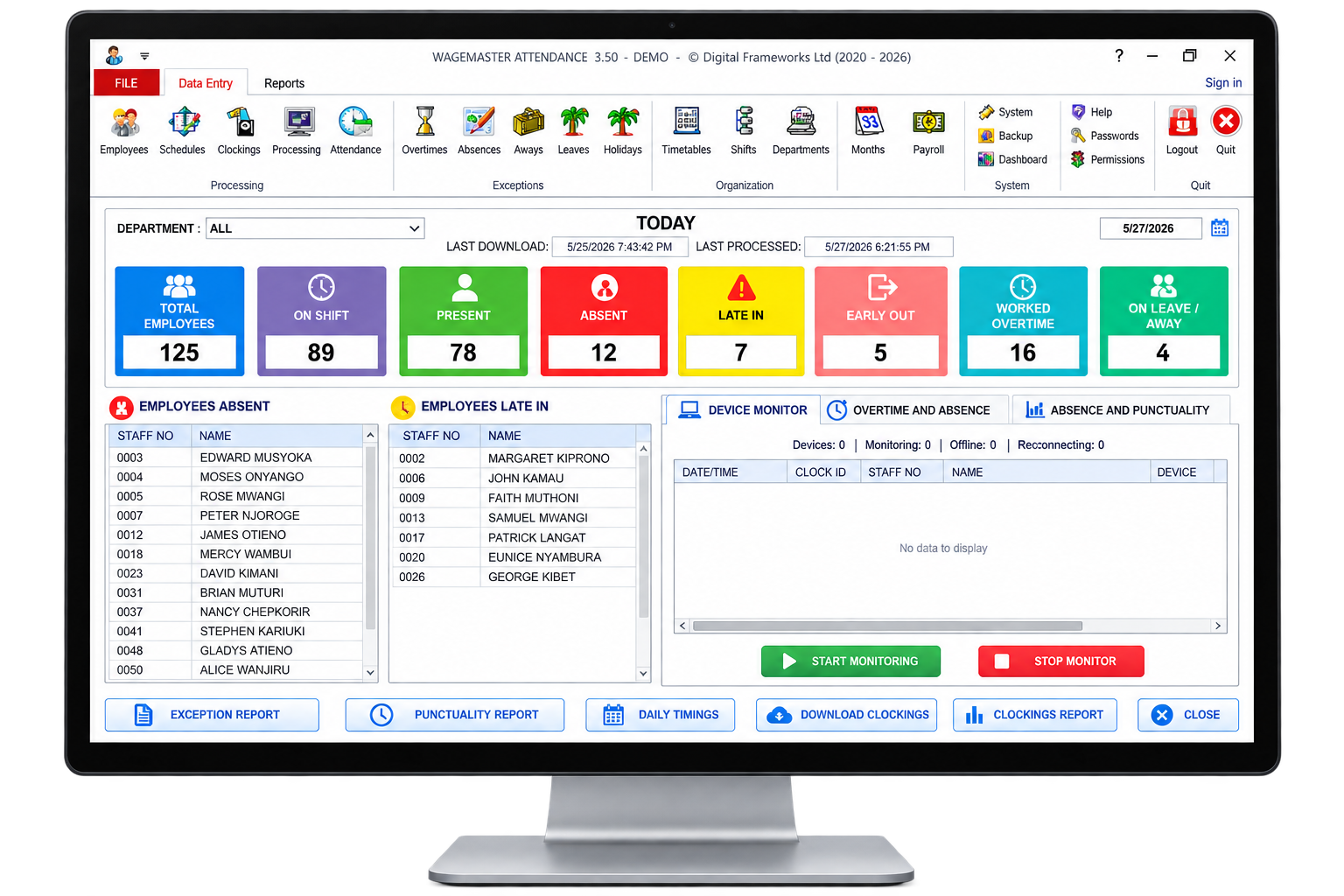
Key Features of Wagemaster Time Attendance
These features help make Biometric Attendance Software useful for businesses that need to manage employee working hours, shifts, attendance exceptions and payroll-related attendance information from a structured system.
Daily Hours Worked
Wagemaster Time Attendance records the time employees clock in and out and uses this information to calculate their daily working hours. HR can quickly see how many hours each employee has worked without manually adding up attendance records.
Late and Absent Hours
The system helps identify employees who arrive late, leave early or are absent. Instead of checking attendance registers manually, HR can review late and absent hours from the attendance reports and follow up where necessary.
Overnight Shifts
Employees who work across two different days can be difficult to track using simple attendance records. Wagemaster can handle overnight shifts, making it easier to calculate working hours correctly even when an employee clocks in on one day and clocks out the following day.
Multiple Timetables
Not every employee works the same schedule. Wagemaster allows businesses to create different timetables for different groups of employees. This is useful for organisations with standard office hours, flexible schedules, early shifts or night shifts.
Shift Rotations
For businesses where employees rotate between different shifts, the system helps manage those changing schedules. HR can organise employees according to their assigned shifts and track attendance against the correct timetable.
Meetings, Leave and Holiday Exceptions
Not every day follows the normal work schedule. Employees may be attending meetings, taking approved leave or observing holidays. Wagemaster allows these exceptions to be accounted for so that legitimate absences or schedule changes are not incorrectly treated as attendance problems.
Automatic Shift Assignment
Managing shifts manually can become difficult as the number of employees grows. Wagemaster can automatically assign shifts based on configured attendance rules, reducing the amount of repetitive work HR teams need to do.
Multiple Locations
Businesses with different branches, offices or work sites can manage attendance across multiple locations. This gives HR and management a more centralised view of employee attendance instead of collecting separate attendance records from every branch.
Automatic Posting to Wagemaster Payroll
One of the biggest advantages is the connection between attendance and payroll. Summarised working hours can be posted directly to Wagemaster Payroll, reducing the need to manually transfer attendance information from one system to another. This can make payroll preparation faster and reduce data-entry errors.
Export Summarised Hours to Microsoft Excel
Businesses that still use Excel for some reporting or payroll processes can export summarised attendance hours to Microsoft Excel. This makes it easier to review, analyse or share attendance information without manually copying figures from attendance records.
ZKTeco Biometric Terminals: Choosing the Right Hardware
The biometric terminal is the point where employee attendance enters the system.
And this is where businesses need to look beyond price.
When choosing hardware for Biometric Attendance Software, businesses should consider the authentication method, connectivity, employee capacity, installation environment and compatibility with the attendance platform.
ZKTeco produces a range of attendance terminals with different identification methods and capabilities. Wagemaster’s current product range includes models such as the ZKTeco K40, MB20, F18, F22, MB360, SpeedFace-V3L, SpeedFace-V5L, TF1700, Horus E1 and S922. Prices vary significantly between models, so the right choice depends on the organisation’s requirements rather than simply choosing the cheapest device.
For example, Wagemaster currently lists:
ZKTeco K40 — KSh 24,000
ZKTeco MB20 — KSh 27,700
ZKTeco F18 — KSh 38,000
ZKTeco F22 — KSh 39,900
ZKTeco SpeedFace-V3L — KSh 49,900
ZKTeco SpeedFace-V5L — KSh 84,900
ZKTeco S922 — KSh 120,000.
These are examples of the products currently displayed in Wagemaster’s shop and may change, so businesses should confirm the current specification and price before purchasing.
What should you consider?
Start with the authentication method.
Some workplaces may prefer fingerprint verification. Others may benefit from facial recognition or RFID cards. Wagemaster’s ZKTeco range supports different combinations of these methods depending on the terminal.
Then look at connectivity.
Depending on the model and configuration, attendance data may be transferred using Ethernet, Wi-Fi or USB.
Employee capacity matters too.
Wagemaster’s product information describes certain ZKTeco attendance terminals as supporting approximately 1,000–3,000 employees, but capacity is model-specific.
The physical environment matters as well. A device installed at a controlled office entrance may have very different requirements from one installed at a busy warehouse, factory or outdoor access point.
Explore the available ZKTeco terminals
View ZKTeco Attendance Terminals on the Wagemaster Shop
A good Biometric Attendance Software solution should make it easier to capture employee clockings, manage shifts, identify lateness and absences, handle legitimate exceptions, manage multiple locations and prepare attendance data for payroll.
The biometric terminal is only one part of that process.
ZKTeco provides a range of attendance terminals with different capabilities, while Wagemaster provides the software layer for analysing attendance data and connecting summarised working hours with payroll.
For organisations comparing Biometric Attendance Software solutions in Kenya, the most important question is therefore not simply:
“Which biometric machine should we buy?”
It is:
“How will this system turn employee clockings into accurate, usable workforce and payroll information?”
That is where the right combination of ZKTeco biometric terminals and Wagemaster Time Attendance Software can make a practical difference.
For businesses looking for Biometric Attendance Software, combining compatible attendance hardware with software that can organise attendance data and connect it to payroll can provide a more structured approach to employee time management.
Explore Wagemaster Time Attendance
Wagemaster Time Attendance Software
https://wagemaster.co.ke/biometric-time-attendance-software-in-kenya/
ZKTeco Attendance Terminals
https://wagemaster.co.ke/shop/?orderby=price
Wagemaster Payroll & HR Software
https://wagemaster.co.ke/best-payroll-software-in-kenya/
Wagemaster Downloads
https://wagemaster.co.ke/wagemaster-downloads/
